FastAPI: Understanding APIs and FastAPI intuitively for AI/ML roles
When beginners hear the word FastAPI, they often think it is just another Python framework. But before learning FastAPI, it is more important to understand the problem it solves.
What happens when you open a website? How does the website know that you want to see the homepage? What happens when you submit a login form? How does a website read data from a database, store new data, update old data, or delete something?
All of this happens through communication between the frontend and the backend. APIs make this communication possible, and FastAPI helps us build these APIs in Python.
This blog builds that understanding from the beginning, using simple examples from a website such as conceptsofai.in.
Imagine Visiting a Website
Suppose you open your browser and visit conceptsofai.in.
You type the website address, press Enter, and the homepage appears.
It may look as if the browser is simply opening the website. But technically, the browser is sending a request to the server where the website is running.
The browser is asking:
“Please send me the homepage of conceptsofai.in.”
The server receives this request, prepares the required page, and sends a response back.
The browser is the client because it requests something.
The website server is the backend because it receives the request, performs some work, and sends a response.
The complete flow is:
Browser → Request for homepage → Website server
Browser ← Homepage response ← Website server
This request-response cycle is the basic foundation of how websites work. HTTP is the communication protocol used between the client and the server.[developer.mozilla][github]
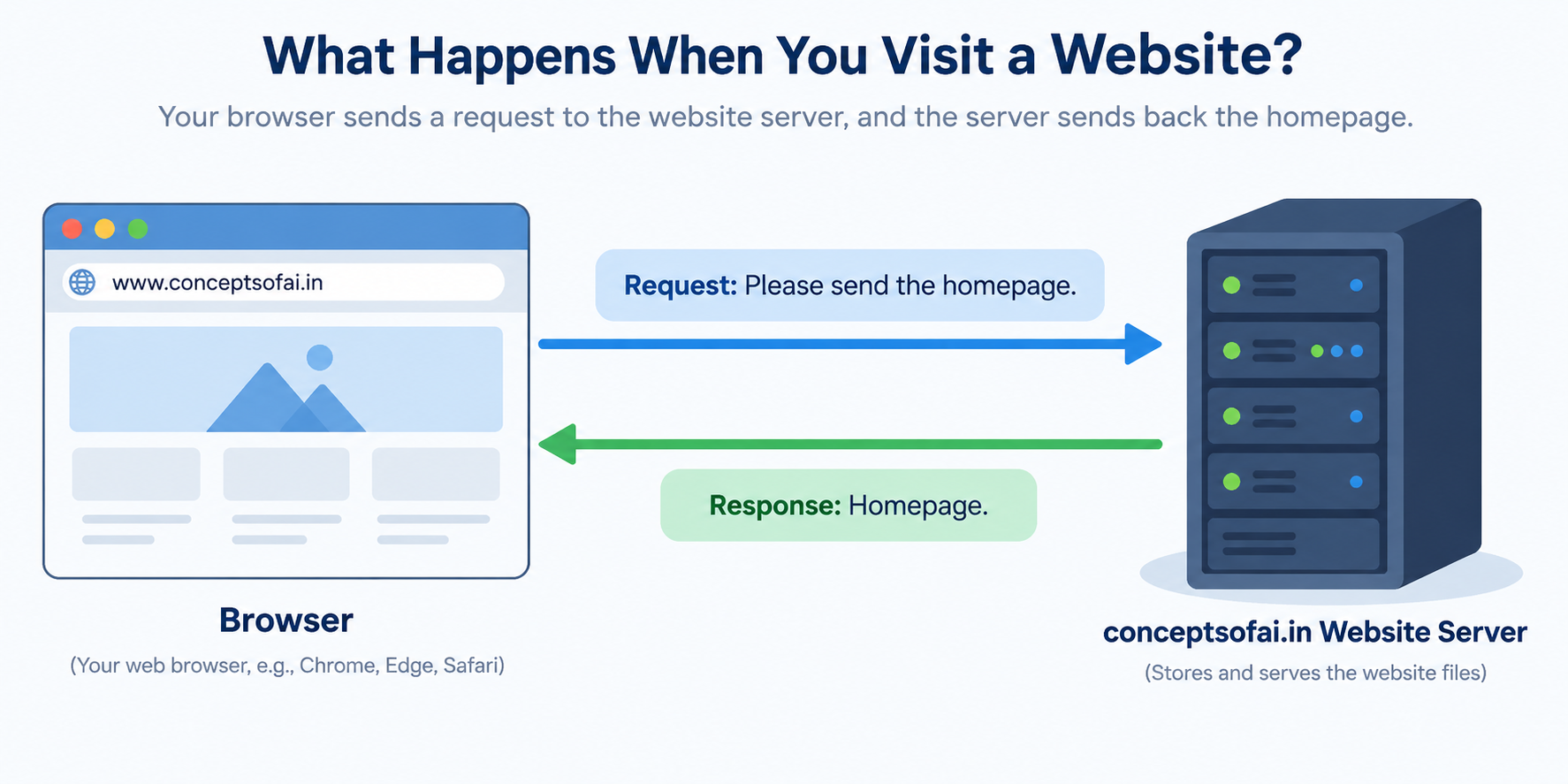
[Figure 1: A simple visual showing a browser sending a request to conceptsofai.in and receiving the homepage in response]
What Happens When You Visit a URL?
Suppose you visit:
conceptsofai.in/login
The browser sends a request asking for the login page.
Suppose you visit:
conceptsofai.in/blogs
The browser sends a request asking for the blogs page.
The part after the domain, such as /login or /blogs, helps the backend understand what the client wants.
However, the path alone does not tell the complete story. The backend also needs to know what action the client wants to perform.
For example, /login can represent two different actions:
Show the login page.
Process the login details submitted by the user.
The path may be the same, but the action is different. This is why HTTP methods such as GET and POST are important.
What Is an API?
An API is a communication bridge between two software systems.
Suppose conceptsofai.in has:
A frontend that users interact with.
A backend that contains the application logic.
A database that stores users, blogs, comments, and other information.
The frontend should not directly access the database. Instead, it communicates with the backend through APIs.
For example, when the blog page needs data, the frontend asks the backend:
“Give me all the blogs.”
The backend then:
Receives the request.
Talks to the database.
Retrieves the required blog data.
Sends the data back to the frontend.
The flow looks like this:
Frontend → API request → Backend → Database
Frontend ← API response ← Backend ← Database
The API acts as a controlled entry point to the backend. It decides what information can be requested, what data can be submitted, and which actions a user is allowed to perform.
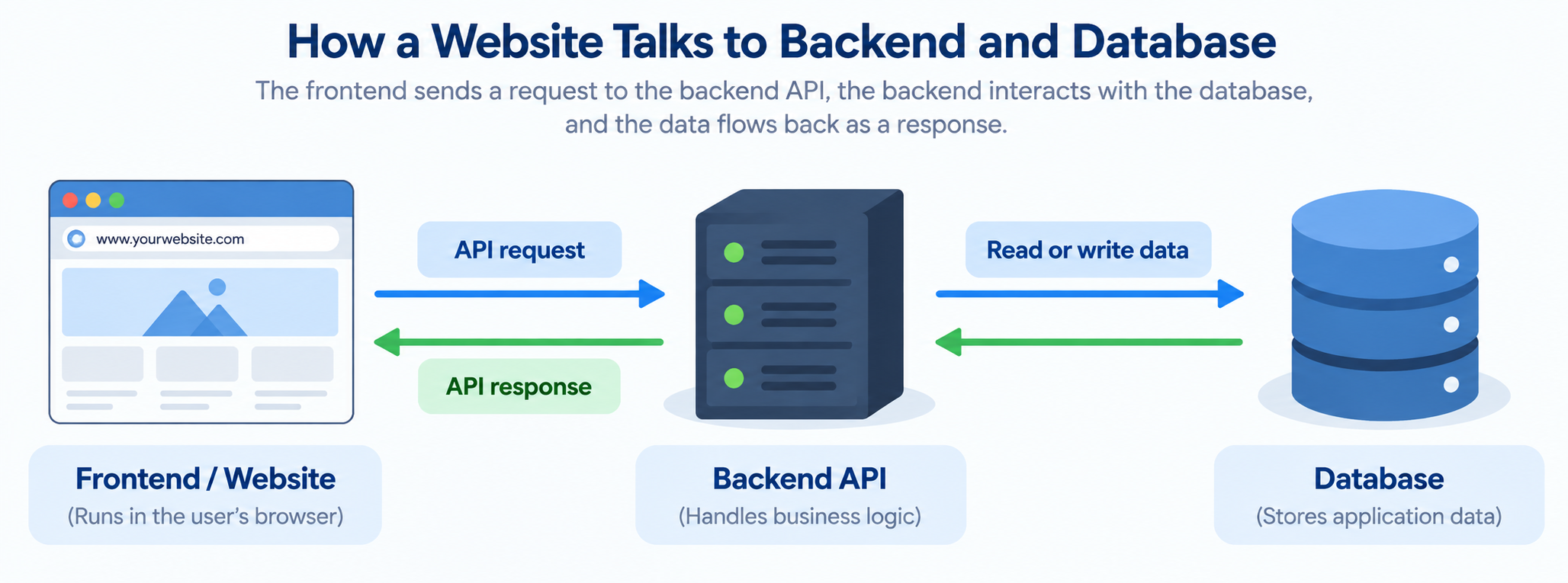
[Figure 2: Frontend communicating with a backend API, which then communicates with a database]
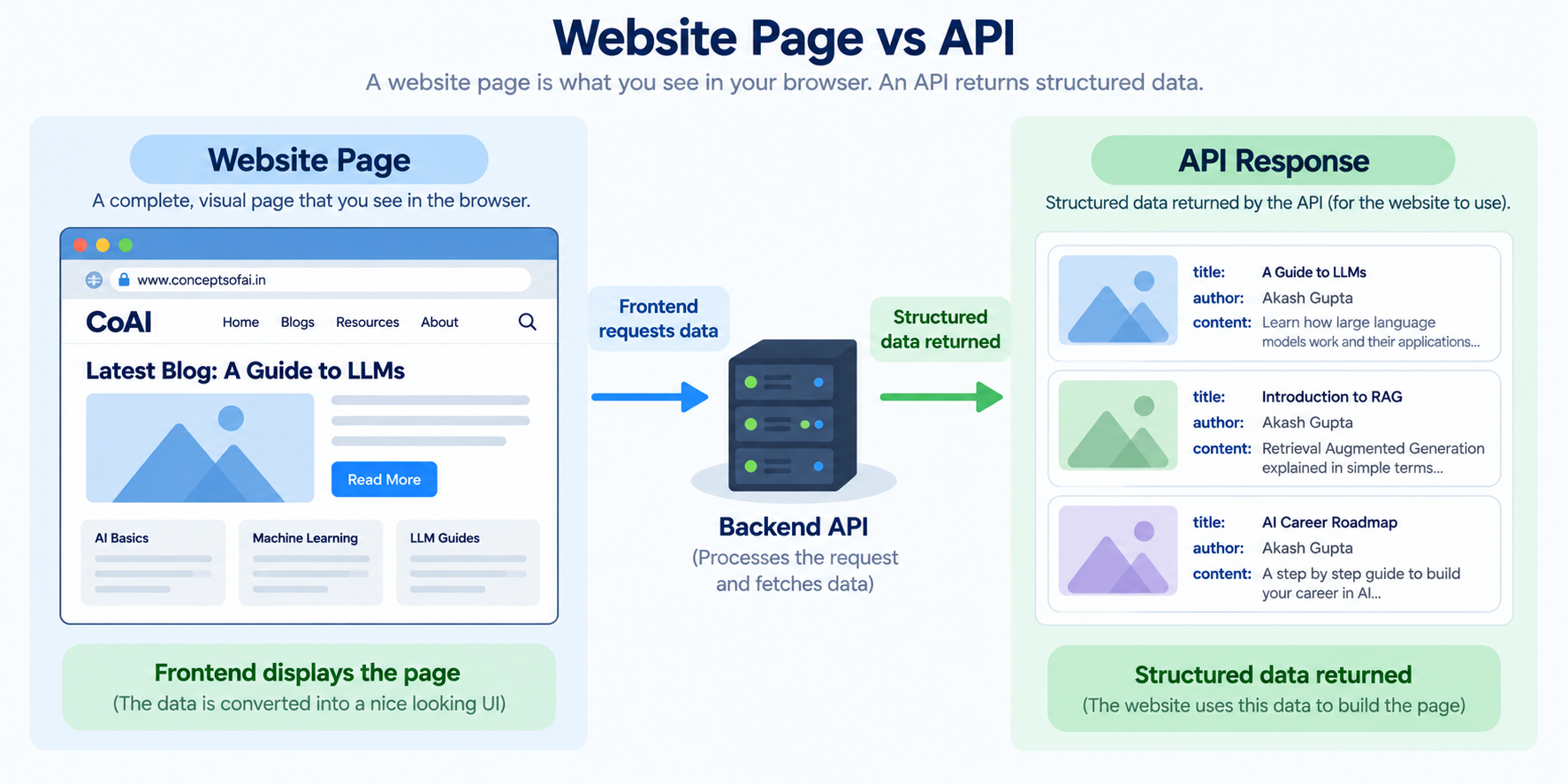
Website Page and API Are Different
Suppose you visit:
conceptsofai.in/blogs
The server may return a complete webpage containing:
Blog titles.
Images.
Buttons.
Navigation menus.
Styling.
JavaScript.
This page is designed for a human user.
But the frontend may separately request blog data from an API such as:
conceptsofai.in/api/blogs
The API may return structured blog information that the frontend can display on the page.
The user sees one website, but behind the scenes the frontend may be calling several APIs.
The process may look like this:
The user opens the website.
The browser receives the frontend page.
The frontend asks the backend for blog data.
The backend communicates with the database.
The backend sends the blog data back.
The frontend displays the blogs.
So, an API endpoint is usually not a separate webpage for users. It is a backend entry point through which software systems exchange data.
What Is a GET Request?
A GET request means:
“I want to read or retrieve something.”
When you open the homepage of a website, your browser generally sends a GET request.
Examples include:
GET request to
/to request the homepage.GET request to
/loginto request the login page.GET request to
/blogsto request a list of blogs.GET request to
/blogs/101to request one particular blog.
When you open:
conceptsofai.in/login
you are essentially telling the backend:
“Please show me the login page.”
The backend receives this request and runs the function responsible for returning the login page.
Similarly, when you open:
conceptsofai.in/blogs
the backend may run a function that retrieves blogs and returns them.
A GET request is generally used for reading or retrieving information.[developer.mozilla][fastapi.tiangolo]
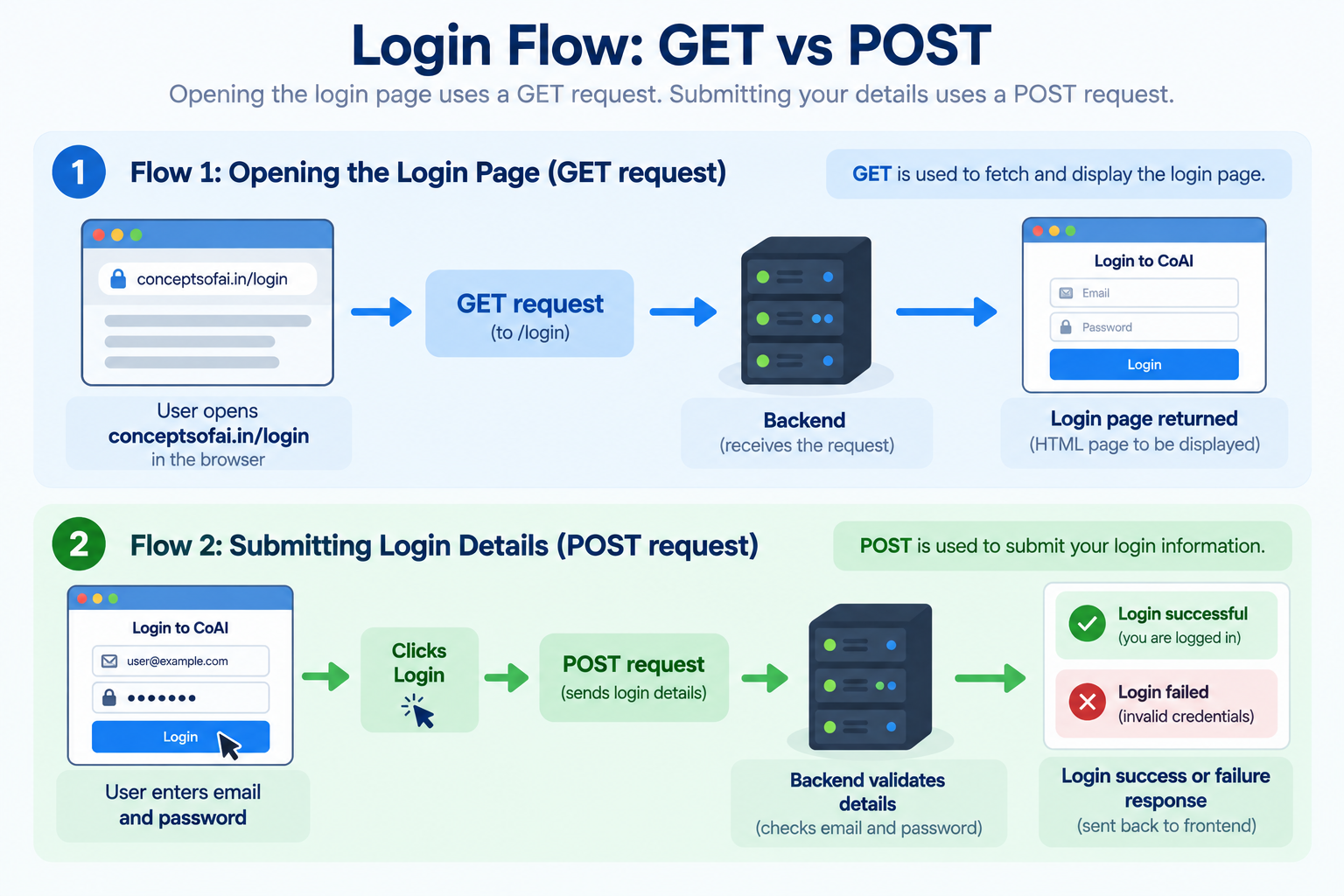
Opening a Login Page
Let us understand the login process step by step.
First, you open:
conceptsofai.in/login
At this point, you have not entered or submitted your email and password. You are only asking the server to show you the login page.
The flow is:
Browser → GET request for /login → Backend
Browser ← Login page ← Backend
The backend may have a function whose responsibility is:
“When someone requests /login, return the login page.”
This is a read operation. The database may not be changed at this stage.
What Is a POST Request?
Now the login page is visible. You enter your email and password and click the Login button.
The browser now needs to send this information to the backend.
This is not just a request to view a page. It is a request to submit data for processing.
That is why a POST request is used.
The flow becomes:
Browser → POST request with login details → Backend
Browser ← Login result ← Backend
The backend may then:
Check whether the user exists.
Verify the password.
Create a login session or token.
Return a success or failure response.
This means the same login path can be used for two different operations:
GET
/loginmeans show the login page.POST
/loginmeans process the submitted login details.
Opening a form is usually a GET operation.
Submitting a form is usually a POST operation.
[Figure 3: Login flow showing GET for opening the login page and POST for submitting login details]
Why Do We Need Different HTTP Methods?
Suppose a website has a blog section. The backend receives a request related to blogs, but how will it know what the user wants?
Does the user want to:
Read blogs?
Add a new blog?
Update an existing blog?
Delete a blog?
HTTP methods make the intention clear.
GET
GET is used to read or retrieve data.
For example:
GET /api/blogs
This means:
“Give me the blogs.”
POST
POST is used to send data to the backend or create something new.
For example:
POST /api/blogs
This means:
“Here is a new blog. Store it.”
PUT
PUT is generally used to replace an existing resource completely.
For example:
PUT /api/blogs/101
This means:
“Replace the complete information of blog 101.”
PATCH
PATCH is used to update part of an existing resource.
For example:
PATCH /api/blogs/101
This means:
“Update some information in blog 101.”
DELETE
DELETE is used to remove something.
For example:
DELETE /api/blogs/101
This means:
“Delete blog 101.”
These methods tell the backend what type of operation the client wants to perform.[developer.mozilla][http]
Understanding APIs Through a Blog Database
Suppose conceptsofai.in stores blog information in a database.
A blog record may contain:
Blog ID.
Blog title.
Blog content.
Author name.
Publication status.
Date of publication.
Now let us see how different website actions interact with the database.
Reading All Blogs
When a visitor opens the blogs page, the frontend needs to read blog data.
It sends a GET request to:
/api/blogs
The backend receives the request and asks the database for all published blogs.
The database returns the records, and the backend sends them to the frontend.
The flow is:
Visitor opens blog page
Frontend sends a GET request
Backend asks the database for blogs
Database returns blog data
Backend sends the data to the frontend
Frontend displays the blogs
Nothing new is created, and nothing is changed in the database. The operation only reads existing information.
Reading One Blog
Suppose a visitor clicks on a particular blog.
The frontend may send a GET request to:
/api/blogs/101
This means:
“Give me the blog whose ID is 101.”
The backend uses the ID to find the correct blog in the database and returns it to the frontend.
Creating a New Blog
Now imagine that an admin writes a new blog and clicks the Publish button.
The frontend sends a POST request to:
/api/blogs
The request contains the new blog’s information, such as its title, content, author, and status.
The backend receives the data and:
Checks whether the required information is present.
Verifies that the admin has permission to publish.
Sends the data to the database.
Stores a new blog record.
Sends a success response back to the frontend.
The flow is:
Admin fills the blog form
Admin clicks Publish
Frontend sends a POST request
Backend validates the blog information
Database stores the new blog
Backend sends a response
POST is used because new data is being submitted to the backend.
Updating an Existing Blog
Suppose the admin changes the title of blog 101.
The old title is:
Introduction to FastAPI
The new title is:
FastAPI for Beginners
The frontend may send a PATCH request to:
/api/blogs/101
This means:
“Update part of blog 101.”
The backend finds blog 101 and changes only the title in the database.
If the admin wants to replace the complete blog record, the application may use PUT instead.
A simple way to remember the difference is:
PATCH updates selected parts.
PUT replaces the complete resource.
Deleting a Blog
If the admin clicks the Delete button for blog 101, the frontend may send a DELETE request to:
/api/blogs/101
This means:
“Remove blog 101.”
The backend first checks whether the admin has permission to delete it. If the permission is valid, the backend removes the blog from the database or marks it as deleted.
The browser does not directly delete anything from the database. It sends a request to the backend, and the backend performs the operation in a controlled way.
[Figure 4: Database flow showing reading, creating, updating, and deleting blog records]
What Is an Endpoint?
An endpoint is a specific entry point in the backend that performs a particular operation.
It is easiest to understand an endpoint as:
HTTP method + path + backend function
For example:
GET
/api/blogscan be connected to a function that reads all blogs.GET
/api/blogs/101can be connected to a function that reads blog 101.POST
/api/blogscan be connected to a function that creates a new blog.PATCH
/api/blogs/101can be connected to a function that updates blog 101.DELETE
/api/blogs/101can be connected to a function that deletes blog 101.
The path tells the backend which resource is involved.
The method tells the backend what action is requested.
The backend function contains the actual logic.
So, when someone says that /login is an endpoint, the more complete explanation is:
GET /login is an endpoint for showing the login page.
POST /login is an endpoint for processing the login details.
They have the same path, but they perform different operations.
Where Does FastAPI Fit?
FastAPI helps us create these backend endpoints in Python.
Think of FastAPI as a receptionist in an office.
A visitor comes in with a request. The receptionist checks what the visitor needs and sends them to the correct department.
FastAPI does something similar:
It receives the request from the frontend.
It checks the method and path.
It identifies the correct backend function.
It passes the required information to that function.
The function communicates with the database, AI model, or other service.
FastAPI sends the result back to the frontend.
For example, when the frontend sends a GET request to /api/blogs, FastAPI identifies the function responsible for reading blogs.
That function may ask the database for the records and return them. FastAPI then sends the result back to the browser.
The flow is:
Browser
Request: GET /api/blogs
FastAPI application
Correct backend function
Database
Blog records
FastAPI response
Browser
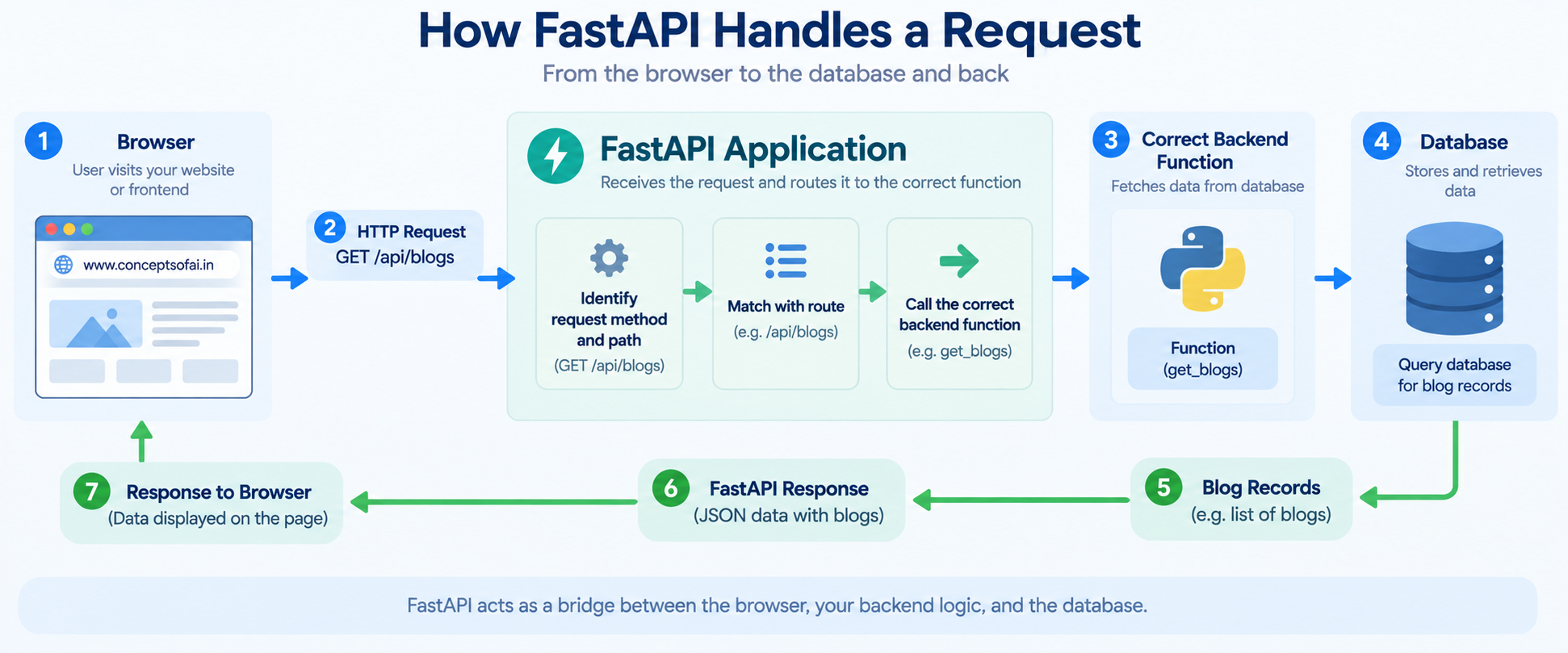
mini boss Figure 5: FastAPI receiving a request, selecting the correct function, communicating with the database, and returning a response]
FastAPI does not replace the database.
It does not automatically contain your complete business logic.
It provides the backend structure that allows requests to reach the correct Python functions and allows those functions to return responses.
What Happens When You Submit a Form?
Consider a registration form on a website.
The user enters their name, email, and password and clicks Submit.
The browser collects the information and sends it to the backend using a POST request.
The backend may then:
Check whether all fields are present.
Validate the email format.
Check whether the email already exists.
Securely process the password.
Store the user in the database.
Return a success or error response.
The flow is:
User fills the form
User clicks Submit
Browser sends a POST request
FastAPI receives the request
Backend validates the information
Database stores the user
Backend sends a response
This same pattern is used for:
Login forms.
Registration forms.
Contact forms.
Payment forms.
Blog publishing forms.
Feedback forms.
AI question forms.
Whenever the user sends information to the server, the frontend usually uses a POST, PUT, or PATCH request depending on the purpose.
What Happens When You Ask an AI Question?
Suppose conceptsofai.in has an AI assistant.
The user types:
“What is retrieval-augmented generation?”
and clicks Ask.
The frontend sends a POST request to an API endpoint such as:
/api/ask
The backend receives the question and sends it to the AI pipeline.
The AI pipeline may:
Search a document database.
Retrieve relevant information.
Send the question and context to an LLM.
Generate an answer.
Return the answer to the backend.
FastAPI then sends the answer back to the frontend, and the frontend displays it to the user.
The flow is:
User asks a question
Frontend sends a POST request
FastAPI receives the question
Backend calls the RAG or LLM pipeline
FastAPI returns the answer
Frontend displays the response
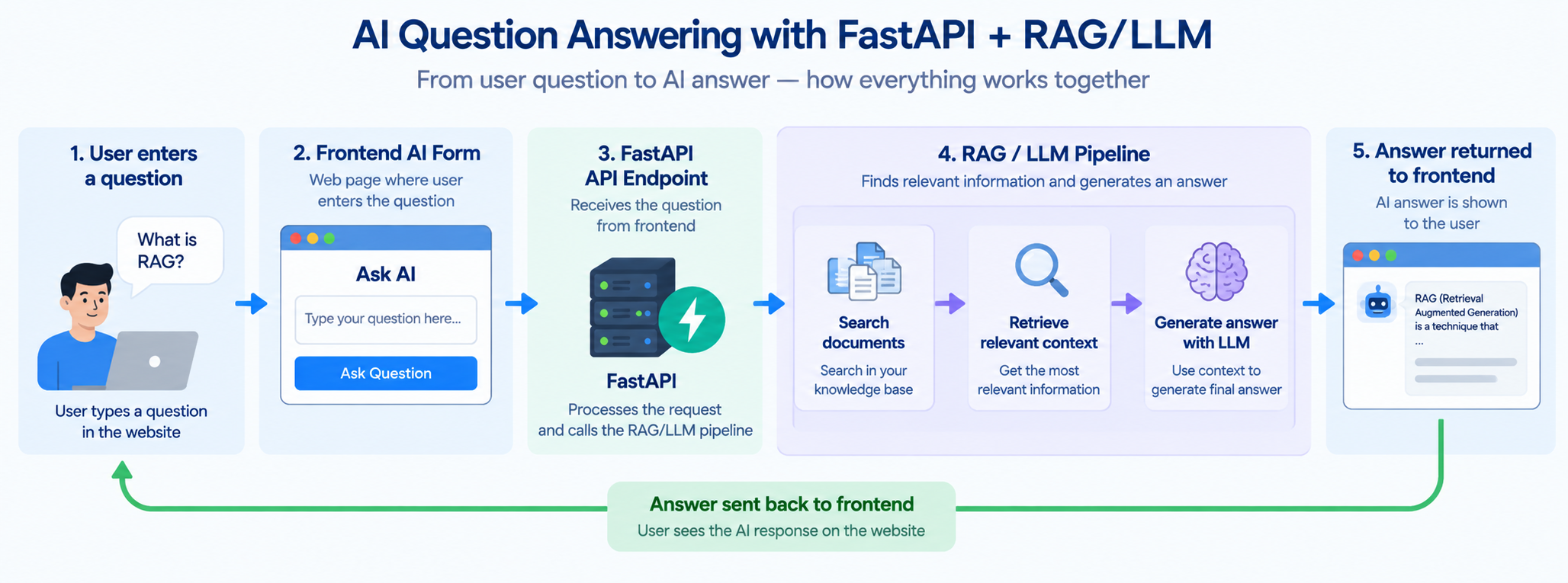
[Figure 6: FastAPI connecting an AI question form to a retrieval and language model pipeline]
The AI model performs the intelligence-related work. FastAPI provides the communication layer that allows other applications to use the model.
The same pattern can be used for:
Machine learning predictions.
Document processing.
AI agents.
Recommendation systems.
Image classification.
Speech processing.
What Happens When a Request Fails?
The server may not always be able to complete a request.
For example:
The blog may not exist.
The user may enter an incorrect password.
The user may not have permission to delete a blog.
Required form information may be missing.
The database may be unavailable.
The backend communicates the result using a status code.
Some common status codes are:
200 means the request was successful.
201 means a new resource was created.
400 means the request contains invalid information.
401 means authentication is required or has failed.
403 means the user is not allowed to perform the action.
404 means the requested resource was not found.
500 means something went wrong on the server.
For example, if a visitor requests:
GET /api/blogs/999
but blog 999 does not exist, the backend may return a 404 response.
If someone tries to delete a blog without permission, the backend may return a 403 response.
These responses help the frontend decide what message to show to the user.
Why Is FastAPI Useful?
FastAPI is useful because it provides a structured way for Python applications to communicate with browsers, frontend applications, mobile applications, and other backend services.
It helps developers:
Connect paths and HTTP methods to backend functions.
Receive information from forms and frontend applications.
Validate incoming data.
Communicate with databases.
Return structured responses.
Create APIs for machine learning and AI applications.
Generate API documentation.
Handle requests involving external services.
FastAPI does not change the basic request-response process. It makes that process easier to implement in Python.
FastAPI and Flask
Flask can also be used to create backend routes and APIs. You can use Flask to handle login requests, blog operations, database communication, and AI model requests.
The main difference is in the development experience.
Flask is lightweight and flexible. It gives you a small foundation, and you choose many additional tools and patterns yourself.
FastAPI is designed more specifically for modern API development. It works closely with Python type hints, provides automatic data validation through Pydantic, supports asynchronous programming, and generates API documentation.
This can be especially useful for:
Machine learning APIs.
LLM and RAG backends.
AI agent services.
Microservices.
APIs used by frontend and mobile applications.
This does not mean Flask is outdated or that FastAPI is always the correct choice. Flask remains useful for simple applications and projects where developers want complete control over the structure.
FastAPI is often preferred for API-focused applications because many useful features are available from the beginning.[fastapi.tiangolo][betterstack]
The Simplest Mental Model
You can understand the whole concept through this example:
conceptsofai.in/login
When you open the page:
GET /login
you are saying:
“Show me the login page.”
When you fill in the form and press Submit:
POST /login
you are saying:
“Here are my login details. Please process them.”
When you open the blog list:
GET /api/blogs
you are saying:
“Give me the blog data.”
When an admin publishes a new blog:
POST /api/blogs
you are saying:
“Store this new blog.”
When an admin changes a blog:
PATCH /api/blogs/101
you are saying:
“Update part of blog 101.”
When an admin deletes it:
DELETE /api/blogs/101
you are saying:
“Remove blog 101.”
FastAPI receives these requests, identifies the correct backend function, allows that function to communicate with the database or AI system, and sends the result back.
Final Takeaway
An API is a communication bridge between the frontend and the backend.
When you open a website, view a page, submit a form, search for a blog, publish content, or ask an AI question, your browser or frontend application sends requests to backend endpoints.
GET is generally used to read or retrieve information.
POST is used to submit data or create something new.
PUT and PATCH are used to update existing information.
DELETE is used to remove information.
An endpoint is not just a URL. It is a combination of the HTTP method, path, and backend function responsible for handling the request.
FastAPI helps us create these endpoints and connect them to Python logic, databases, machine learning models, and AI systems.
Once you understand what happens when you open a homepage, submit a login form, or update a blog record, FastAPI becomes much easier to learn.
It is simply the Python-based backend layer that receives requests, runs the correct function, communicates with other systems, and sends responses back.